Claude limits, explained
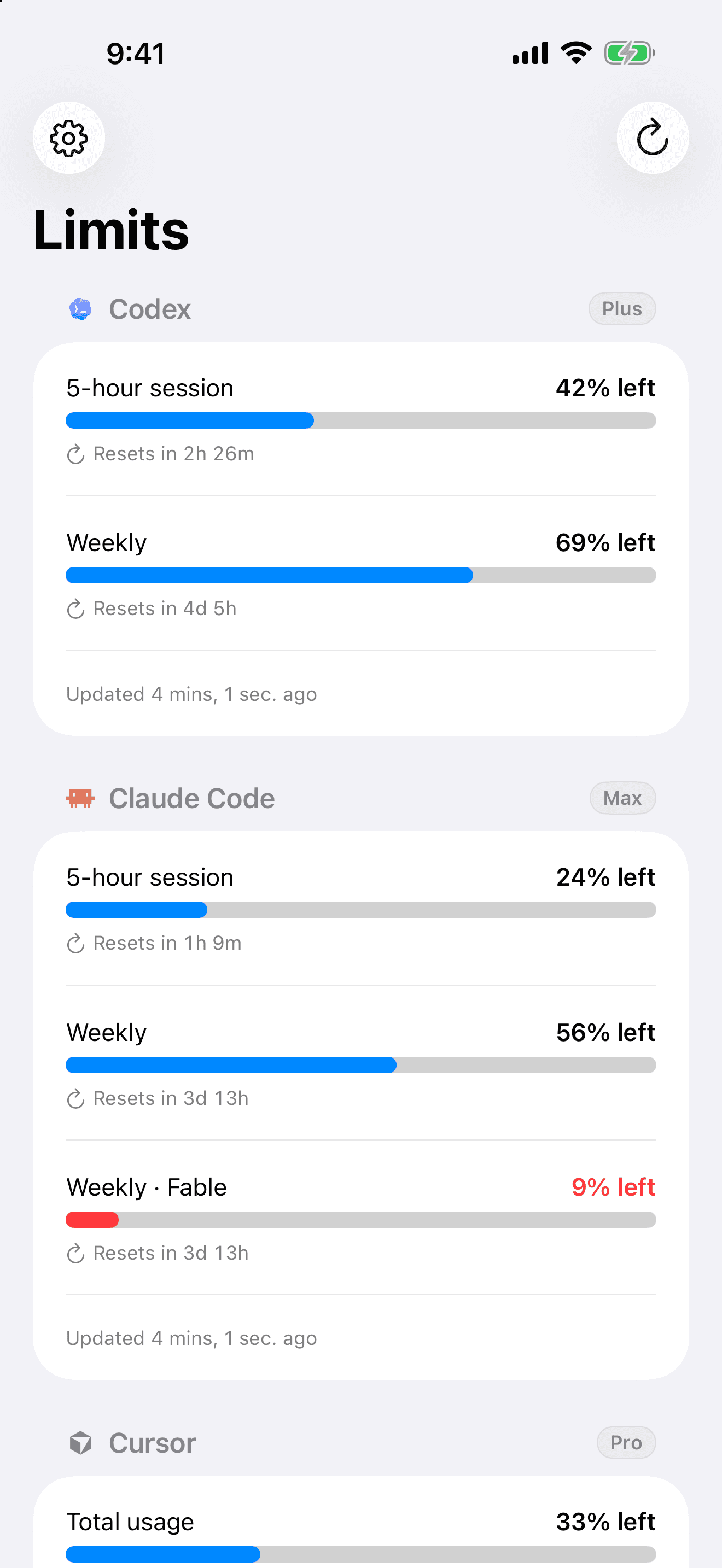
Claude limits your usage in two ways: a rolling 5-hour session limit, and a weekly limit that resets on a fixed schedule, with tighter weekly caps on its most capable models. The hard part is that Claude never shows you how much you have left. Limits does.
01
The 5-hour session limit
Usage is measured in a rolling five-hour window. Hit it and you wait for the window to roll forward. Limits shows the exact time it frees up.
02
The weekly limit
On top of the session window, Claude caps how much you can use over a week. Limits counts down to the reset so you can pace the rest of your week.
03
Model-specific caps
The most capable models carry their own weekly allowance. Limits tracks each one so you know which model to reach for.
common questions
- What is Claude's 5-hour limit?
- Claude measures usage in a rolling five-hour session. When you reach the limit, you wait for the window to advance. Limits shows exactly when that happens.
- When do Claude's weekly limits reset?
- Weekly limits reset on a fixed schedule tied to your account. Limits displays the precise countdown instead of leaving you to guess.
- How do I see how much Claude limit I have left?
- Install Limits, connect your Claude account, and your remaining session and weekly usage appear as bars with reset timers on your iPhone.
keep your usage in view.
free to start, on your iphone. no dashboards, no guessing.
download on the app store